Functions for a phone call
The functions available during a call may vary depending on the profile supported by your smartphone or mobile phone. In addition, even if the profile is the same, the available functions may vary depending on the smartphone or mobile phone.
Depending on the connected device or the application you are using, the functions may not work properly even if you try to operate them with the headset.
Refer to the operating instructions supplied with the smartphone or mobile phone.
Supported profile: HFP (Hands-free Profile)
During standby/music playback
- Press and hold the button on the right unit for about 2 seconds to start up the voice dial function of the smartphone/mobile phone, or activate the Google™ app on the Android smartphone or Siri on the iPhone.
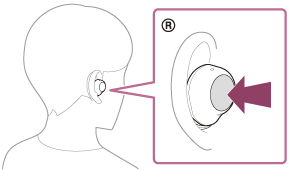
Outgoing call
You can use either the left or right unit to perform the following operations.
When using only one unit of the headset, operate the unit you are using.
- Press the button once to cancel an outgoing call.
- Press and hold the button for about 2 seconds to change the call device back and forth between the headset and the smartphone/mobile phone.
Incoming call
You can use either the left or right unit to perform the following operations.
When using only one unit of the headset, operate the unit you are using.
- Press the button once to answer a call.
- Press and hold the button for about 2 seconds to reject a call.
During call
You can use either the left or right unit to perform the following operations.
When using only one unit of the headset, operate the unit you are using.
- Press the button once to finish a call.
- Press and hold the button for about 2 seconds to change the call device back and forth between the headset and the smartphone/mobile phone.
Supported profile: HSP (Headset Profile)
You can use either the left or right unit to perform the following operations.
When using only one unit of the headset, operate the unit you are using.
Outgoing call
- Press the button once to cancel an outgoing call.
Incoming call
- Press the button once to answer a call.
During call
- Press the button once to finish a call.
Note
- When you are using only one unit of the headset, be sure to set the other unit in the charging case.
https://helpguide.sony.net/