Location and function of parts
Headset
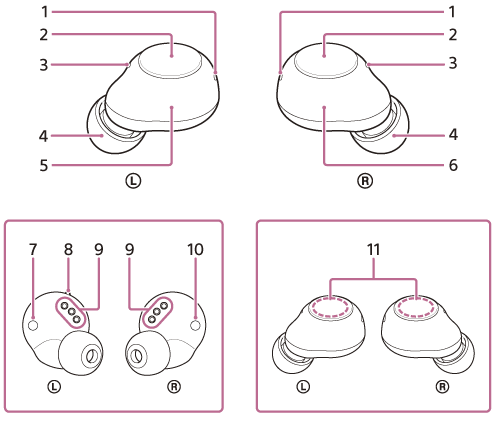
- Indicators (blue/orange) (left, right)
Lights up in orange while charging.
Lights up in blue or orange to indicate the power or communication status of the headset. - Buttons (left, right)
Press to operate the headset. - Microphones (left, right)
Picks up the sound of your voice when talking on the phone. - Earbud tips (left, right)
- Left unit of the headset
- Right unit of the headset
 (left) mark
- Tactile dot
There is a tactile dot on the left unit of the headset. - Charging ports (left, right)
 (right) mark
- Built-in antennas (left, right)
A Bluetooth antenna is built into each left or right unit of the headset.
Charging case
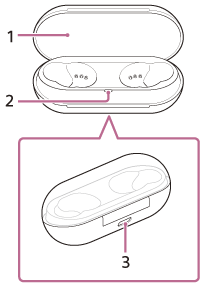
- Lid
- Indicator (orange)
Indicates the charging status. - USB Type-C port
Using the supplied USB Type-C cable, connect the charging case to a computer or to an AC outlet via a commercially available USB AC adaptor to simultaneously charge both the headset and the charging case.
https://helpguide.sony.net/