When you have finished using the headset
When you have finished using the headset, be sure to set the headset in the charging case.
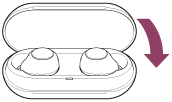
Close the lid of the charging case.
Note
- If perspiration or water is left on the charging port, it may impair the ability to charge the headset. Immediately wipe off any perspiration or water on the charging port after use. When the charging ports of the headset or charging case get dirty, wipe them clean with a soft dry cloth.
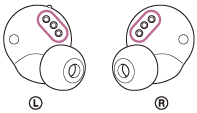
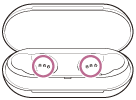
When the headset gets wet
- Use a soft dry cloth to wipe off any water that gets on the headset.
- Remove the earbud tips, turn the sound conduits and the air holes downward, and shake several times to get the water out.
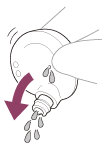
- Turn the microphone hole downward and gently tap it about 5 times on a dry cloth, etc. to remove any water collected inside.

- Leave the headset to dry in room temperature.
https://helpguide.sony.net/