Turning off the headset
-
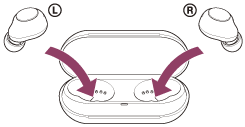
Set the headset into the charging case.
Put the left unit of the headset (the unit with the tactile dot) back into the left hole of the charging case, and put the right unit of the headset back into the right hole of the charging case. Each unit of the headset will be set to the correct position in the charging case by the built-in magnet.
When the headset is set into the charging case, the headset will turn off automatically.
When the remaining battery charge of the charging case is sufficient, the indicators (orange) on the headset light up and the charging of the headset will start.
Hint
- You can also turn off the headset with the “Sony | Headphones Connect” app.
Note
- When the remaining battery charge of the charging case is not sufficient, the charging of the headset will not start. Charge the charging case.
https://helpguide.sony.net/