Turning on the headset
When the headset is set into the charging case
-
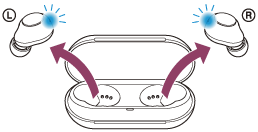
Remove the headset from the charging case.
The headset turns on automatically and the indicators (blue) flash.
When you remove only one unit from the charging case, only the removed unit turns on.
You will hear the voice guidance say, “Power on”.
When the headset is not set into the charging case
The headset turns off just after the headset is initialized. In this case, the headset will turn on by pressing and holding the buttons on both units of the headset for about 2 seconds. The headset will also turn on when it is set into the charging case and then removed from the charging case.
When the headset is turned on
When both headset units are removed from the charging case, the connection between the left and right units of the headset is established.
The headset goes into Bluetooth pairing mode when turning on the headset for the first time after purchase or just after initializing the headset.
https://helpguide.sony.net/